
The Rise of Autonomous Agents in 2025 explores practical patterns, platforms, and governance conside...
How to Automate Internal Processes in 30 Days: A Practical Blueprint
This practical guide provides a 30-day, week-by-week blueprint to automate key internal processes using a mix of RPA, workflow automation, and API-driven integrations. It covers planning, tool selection, governance, testing, deployment, and scaling, with a strong emphasis on data quality, security, and change management.
Introduction
Internal processes are the lifeblood of any organization. From invoice approvals and employee onboarding to IT service requests and procurement, many teams rely on manual, paper-based, or siloed workflows. These frictions dilute productivity, invite errors, and slow decision-making. But with a clear plan, you can automate a meaningful slice of your operations in as little as 30 days—without breaking the bank or derailing strategic priorities.
This guide offers a practical, end-to-end blueprint for automating internal processes within a 30-day window. It blends proven frameworks (Lean, Design Thinking, and Agile) with pragmatic tooling considerations (RPA, workflow automation, and API-based integrations). Whether you’re in finance, HR, IT, or operations, you’ll find a repeatable approach to deliver fast value, maintain governance, and set the stage for scalable automation.
Why automate internal processes—and why now
- Speed and accuracy: Reducing manual data entry and handoffs cuts cycle times and human error.
- Consistency and compliance: Standardized workflows enforce policy and provide auditable trails.
- Employee experience: Teams spend less time on repetitive tasks and more on higher-value work.
- ROI and scalability: Automation pays back quickly, paving the way to automate more complex processes over time.
- Strategic clarity: By mapping and measuring workflows, you reveal bottlenecks and improvement opportunities that matter most to the business.
Pairing automation with strong data governance, security, and user-centric design ensures that speed does not come at the expense of privacy or reliability. The result is a repeatable playbook for accelerating digital transformation across departments.
A 30-day blueprint: Week-by-week plan
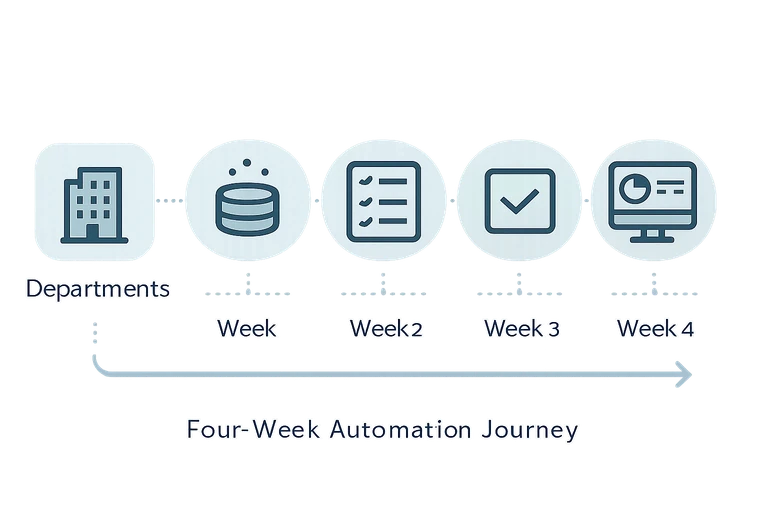
The plan below is designed to deliver a functional automation pilot within four weeks while laying a solid foundation for governance and future scale. Adapt the scope to your organization’s size and complexity, but aim to start with a manageable, high-impact process.
Week 1: Align goals, map the as-is, and choose candidates
- Define success metrics: Pick 2–3 objective metrics (e.g., cycle time reduction, error rate drop, cost per transaction) and establish a target ROI.
- Identify candidate processes: Look for high-volume, rules-based, and manual-heavy tasks with clear data sources. Prioritize processes that touch multiple systems or departments.
- Map the current state (as-is): Create a simple value-stream map or flowchart for each candidate process. Capture stakeholders, data inputs/outputs, decision points, and handoffs.
- Assess data quality and systems: Inventory data sources, owners, and accessibility. Note any data quality issues, duplicates, or missing fields.
- Define the target state: Sketch a high-level workflow showing the automation touchpoints, inputs, outputs, and responsible roles for the pilot process.
Week 2: Design, select tools, and build a minimal viable automation (MVA)
- Choose the automation approach: Decide on a mix of RPA for repetitive UI tasks, workflow automation for approvals and routing, and API-based integration for data movement. Consider AI-assisted components for decision support or natural language processing where appropriate.
- Tool selection criteria: Security, governance, ease of use, scalability, vendor support, and compatibility with your existing tech stack.
- Architect a simple solution: Design an MVP workflow that covers the essential paths, error handling, and audit trails. Define data mappings and triggers.
- Build the MVA: Implement the core automation in a controlled environment (staging or sandbox). Keep scope tight to validate feasibility quickly.
- Establish governance and security basics: Access controls, data minimization, and change-management plan for the pilot.
Week 3: Test, iterate, and extend
- Test with real data (privacy-safe): Run end-to-end tests using representative data. Validate accuracy, timing, and exception handling.
- Incorporate feedback: Collect input from end users and stakeholders. Adjust the workflow, UI prompts, and error messages accordingly.
- Extend automation scope: Add one additional branch or exception path to mirror real-world variability without overcomplicating the MVP.
- Prepare for deployment: Document runbooks, troubleshooting steps, and a rollback plan. Train a small group of power users or a change champion team.
Week 4: Go live, monitor, and optimize
- Go live in production for a controlled cohort: Start with a limited group or a single department to minimize risk.
- Set up monitoring and dashboards: Track the defined KPIs, system health, and exception rates. Establish a weekly review cadence.
- Optimize and harden the solution: Tweak thresholds, improve exception handling, and refine data quality checks.
- Plan for scale: Identify additional processes for the next wave and outline a broader automation roadmap.
Choosing the right automation tools for a fast start
No one-size-fits-all answer exists. The fastest path often combines multiple approaches:
- Workflow automation platforms: Ideal for routing, approvals, and structured processes across systems (e.g., HRIS, ERP, ticketing).
- Robotic Process Automation (RPA): Best for UI automation, legacy systems without APIs, and high-volume, rule-based tasks.
- API-based integrations and iPaaS: Useful for data synchronization, real-time updates, and building composable services.
- AI-powered components: Consider NLP for form extraction, chat-based assistants for internal queries, or ML for decision support where data patterns exist.
When selecting tools, evaluate security and governance capabilities, change management support, and maintainability (code-free vs. code-heavy approaches). Favor solutions that integrate with your existing stack, provide robust auditing, and offer predictable release cycles.
Architectural considerations: a practical blueprint
A lightweight but robust automation architecture usually includes the following layers:
- Automation layer: The engines that execute tasks (RPA bots, workflow orchestrators, AI components).
- Integration layer: API gateways, adapters, and connectors that move data between systems (CRM, ERP, HRIS, file stores).
- Data layer: Centralized or synchronized data sources with validation rules and a clear ownership map.
- Orchestrator and monitoring: A control plane to schedule, monitor, and troubleshoot automations in real time.
- Security and governance: Access controls, audit trails, data privacy safeguards, and incident response procedures.
Start with a minimal viable architecture focused on the pilot process, then layer in additional integrations and governance controls as you scale.
Governance, security, and compliance: essential guardrails
- Data privacy and access control: Apply the principle of least privilege. Use role-based access and ensure sensitive data is masked where possible.
- Auditing and traceability: Maintain logs of who triggered what automation, when, and with which data.
- Change management: Document changes, communicate early, and train users. Appoint a change champion in each department.
- Vendor risk management: Evaluate third-party tools for security certifications and data handling practices.
- Disaster recovery: Define backup routines and rollback procedures in case of automation failures.
Measuring success: metrics that matter
Choose KPIs that reflect both efficiency and quality. Common measures include:
- Cycle time reduction: Time from start to completion per process.
- Defect and exception rate: Frequency of manual interventions or rework.
- Cost per transaction: Labor and operational costs saved per automated item.
- User satisfaction: Qualitative feedback and adoption rates.
- Throughput: Number of completed tasks per unit time.
Use a simple ROI formula: ROI ≈ (Annualized benefits − Annualized costs) / Annualized costs. Track benefits monthly to verify value and adjust the roadmap accordingly.
Change management and user adoption: turning automation into culture
- Engage stakeholders early: Include representatives from affected teams in the planning and design phases.
- Communicate a clear value proposition: Highlight time savings, accuracy, and focus on strategic work.
- Provide training and support: Create bite-sized learning modules and quick-reference guides. Establish a helpdesk for automation-related questions.
- Empower champions: Identify and train power users who can assist peers and advocate for broader adoption.
Real-world use cases: where to start
While every organization is different, these internal processes are commonly ripe for automation:
- Finance: Invoice processing, purchase order matching, expense reporting.
- HR: Onboarding/offboarding workflows, benefits enrollment, payroll data validation.
- IT and facilities: Ticket routing, access provisioning, asset management requests.
- Procurement: Vendor onboarding, contract renewal reminders, approval routing.
- Operations: Quality checks, exception handling, daily reporting pipelines.
From pilot to scale: next steps
After a successful 30-day pilot, the path to scale involves:
- Prioritizing the next wave of processes based on ROI and strategic impact.
- Building an automation marketplace or catalog to centralize requests and ownership.
- Establishing ongoing governance, security reviews, and measured feedback loops.
- Continuing to invest in data quality, integration maturity, and skills development across teams.
Conclusion
Automating internal processes in 30 days is ambitious, but with a disciplined approach, it is achievable and immensely valuable. Start with a focused, high-impact pilot, keep governance tight, and design for scale from day one. The payoff isn’t just faster workflows—it’s less manual toil, better decisions, and a more resilient, data-driven organization. If you’re ready to accelerate your internal operations responsibly and efficiently, start with a clear plan, the right tools, and a strong change-management mindset.
You may also like

DevOps is within reach for SMEs. This practical guide outlines a lean, value-driven approach to auto...

Protecting APIs from leaks requires a defense-in-depth approach: strong authentication, fine-grained...